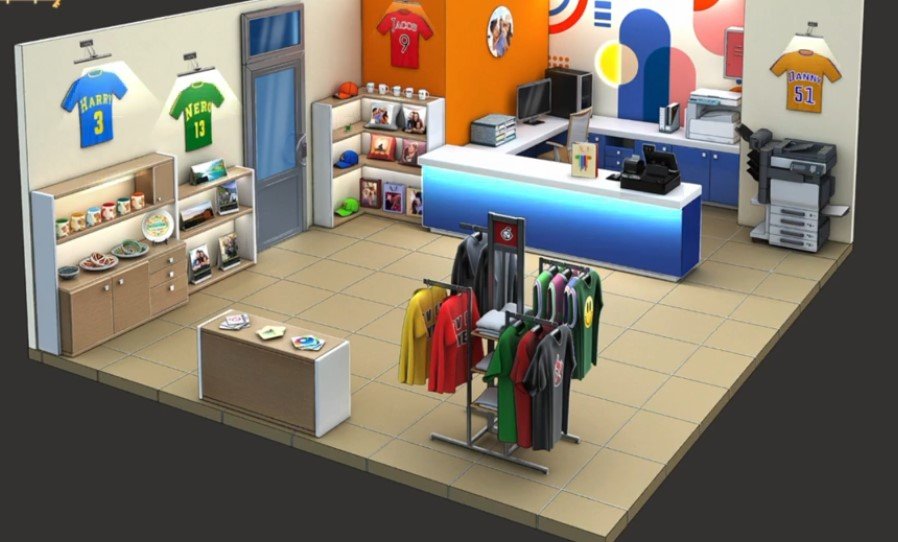
Here you will get solutions and step by step guide for Rooms & Exits Chapter 2 Level 22. In this puzzle developed by Webelinx Games. Every clue tells a story, and every puzzle brings you closer to the truth. Join Fiona, a brave journalist with a sharp eye for hidden secrets, as she investigates mysterious cases filled with unexpected surprises. This level belongs to the No Honor Among Thieves category and is the Print Shop level.
Search for clues, solve challenging puzzles, and uncover the secrets hidden in every location. Each level offers a fresh mystery that will test your observation skills and logical thinking. Whether you enjoy detective stories, escape room challenges, or brain-teasing adventures, this game delivers an exciting experience from start to finish.

Rooms & Exits Print Shop – Chapter 2 Level 22 Solution
The following guide explains how to solve Rooms and Exits Print Shop step by step.
If you get stuck at any point, leave a comment below. Our team will be happy to help you find the solution.
Print Shop Walkthrough
Phase 1: Collect Ink Cartridges & Tools
- Step 1: Tap the display shelves and double-tap the second red cap.
- Step 2: Collect the Green Ink Cartridge hidden underneath.
- Step 3: Go to the front counter and pick up the Shopping Bag.
- Step 4: Dismantle the Shopping Bag in your inventory to obtain the Yellow Ink Cartridge.
- Step 5: Open the red cabinet above the photocopy machine.
- Step 6: Collect the Violet Ink Cartridge.
Phase 2: Solve the Mug Puzzle & Open the Bill Machine
- Step 7: Go to the colored mug display beneath the blue T-shirt.
- Step 8: Tap the mugs in this exact order:
- 3 → 6 → 2 → 5 → 4 → 1
- Step 9: Open the cabinet and collect the Black Ink Cartridge.
- Step 10: Examine the sports jerseys and note the numbers:
- 3, 13, 9, 5
- Step 11: Go to the bill machine at the cash counter.
- Step 12: Enter the code:
- 9J5D3H
- Step 13: Open the tray and collect the DVD/CD and Red Ink Cartridge.
Phase 3: Print the Test Sheet & Escape
- Step 14: Insert the DVD/CD into the computer.
- Step 15: Open the printer’s ink compartment.
- Step 16: Install all five ink cartridges:
- Black
- Green
- Yellow
- Violet
- Red
- Step 17: Turn on the printer.
- Step 18: Enter the code 54 on the computer.
- Step 19: Print and collect the Test Sheet.
- Step 20: Check the Test Sheet to find the color values:
- Blue = 24
- Black = 54
- Yellow = 13
- Red = 8
- Green = 18
- Purple = 39
- Step 21: Go to the exit door.
- Step 22: Enter the correct numbers for the colors requested by the door panel.
- Step 23: Unlock the door and escape to complete Level 22.
Video Walkthrough
Congratulations on completing Chapter 2 – Level 22! Click here to unlock Chapter 2 – Level 23.